Page 1 of 1
HMG IDE
Posted: Sun Sep 05, 2010 5:55 am
by cocoking
How do I use the IDE for existing programs?
Forms were designed using .prg (using DEFINE) but I find counting pixels too tedious. So I'd like to use the IDE to design the GUI part but would also like to continue using my text editor for the non-GUI part.
Is this possible?
Re: HMG IDE
Posted: Mon Sep 06, 2010 5:00 pm
by Rathinagiri
Yes. It is.
The form generator creates a file with extension .fmg. Which is again a .prg file. You can open with a text editor and replace the template with your window name and paste the code in your test editor wherever necessary.
Re: HMG IDE
Posted: Tue Sep 07, 2010 3:14 am
by cocoking
Thanks, Rathi. Please allow me additional questions.
1. How do I create the main menu (pop up with items) in HMG IDE? I can't seem to display it in the form.
2. Is it possible to specify the location of a modal window to be relative to the main form? That is, if (before calling the modal window) the main form is moved, the modal window also adjusts?
3. I'm using a screen ruler (MWSnap/FastStone Capture) to position objects. Is there a better way (aside from HMG IDE, of course)?
I hope somebody finds time to write a user's manual (as opposed to reference manual) for HMG and HMG IDE. It complements the reference manual. It would be a very big help for newbies like me.
With the forum, while very informative and helpful, it is just too easy to miss information, resulting sometimes in repetitive questions. Just a suggestion though, I hope I'm not being too demanding. On the contrary, it will also save the time of Rathi, Sudip, Marek and Esgici (who've been very helpful even with beginners' questions).
Re: HMG IDE
Posted: Wed Sep 08, 2010 2:18 am
by esgici
Hi cocoking
1. How do I create the main menu (pop up with items) in HMG IDE? I can't seem to display it in the form.
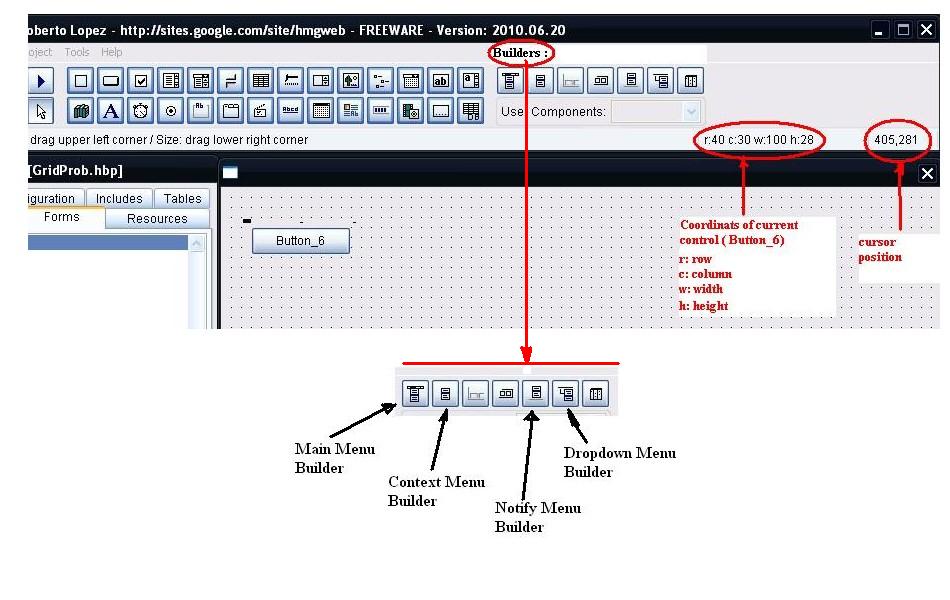
- Some hints for HMG IDE
- IDE_Hints.jpg (90.73 KiB) Viewed 2538 times
Please look at attached image; I hope that it have an answer to your question. IDE include "builders", no for only main menu, for other type menus too.
2. Is it possible to specify the location of a modal window to be relative to the main form? That is, if (before calling the modal window) the main form is moved, the modal window also adjusts?
Auto-adjusting discussed in the forum in various manners. Please use search.
3. I'm using a screen ruler (MWSnap/FastStone Capture) to position objects. Is there a better way (aside from HMG IDE, of course)?
I haven't any idea about tools you are talking about. But HMG-IDE has two perfect features for tracking screen coordinates: coordinates and size of current control and current cursor position. Please look at attached image.
I hope somebody finds time to write a user's manual (as opposed to reference manual) for HMG and HMG IDE. It complements the reference manual. It would be a very big help for newbies like me.
Documentation too discussed for various aspects. In summary, IMHO, HMG reference manual is a perfect source and except for a few conditions it's unnecessary a separate user's manual. More important, HMG is a very dynamic project; everything changes with extremely high speed, so almost every reference source will become stale quickly. Please take a look to very beginning topics (beginning with
What is MiniGUI?, continuing with
Quick Start and
Simple Tutorial 1..17 ) of
HMG General Help forum; simply to HMG Oficial Help. I hope that all this information is sufficient for newbies.
In other hand HMG Doc also include a little but helpful section for IDE:
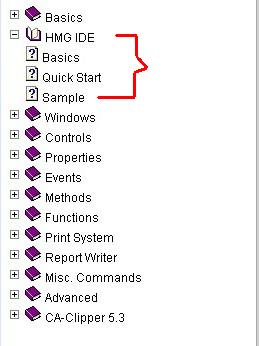
- IDE Section of HMG Doc
- IDE_Help.jpg (16.78 KiB) Viewed 2538 times
Please don't worry about demanding. Persons who respond you was newbies too for a short time ago

Happy HMG'ing

Regards
--
Esgici
Re: HMG IDE
Posted: Wed Sep 08, 2010 8:00 am
by cocoking
TYVM, Esgici. I can really feel your genuine desire to help and your diligence.
Please look at attached image; I hope that it have an answer to your question. IDE include "builders", no for only main menu, for other type menus too.
Actually, I have used the main menu builder, filled up the Caption and Name for several menu items. But when I clicked Ok, the menu did not appear on the form. What do I need to do next?
I haven't any idea about tools you are talking about. But HMG-IDE has two perfect features for tracking screen coordinates: coordinates and size of current control and current cursor position. Please look at attached image.
Yes, the ruler function is built into HMG IDE but I can also use the screen rulers over running program windows. Actually, I was forced to use the screen ruler because I did not know how to use the IDE (ie, can't even make a menu). Notepad ++ as text editor + MWSnap to count screen coordinates, that's how I made my program. As soon as I know HMG IDE, I may no longer have use for screen rulers.
Thanks also for the "help" hints.