Page 1 of 1
API Telegram
Posted: Sat Oct 01, 2022 2:14 am
by jparada
Hi,
I'm testing to make Telegram API calls for bot (based on our friend Riztan's source code)
I'm having trouble with the sendPhoto function since as I understand it requires converting the png image file to base64, so I'm trying something like this:
local cImgLocalPath := "c:\bot_javier\image.png"
cImgFileContent := FileStr( cImgLocalPath )
cBase64ContentFile := hb_Base64Encode( cImgFileContent, Len( cImgFileContent ) )
oBot:sendPhoto( chat_id, "caption", cBase64ContentFile, "" )
but I get this error response:
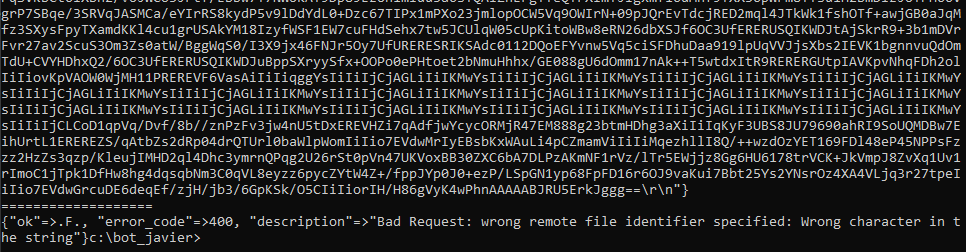
- img.png (52.38 KiB) Viewed 3379 times
do we have some function to convert the image file to base64?, I'm doing something wrong with?.
I appreciate any help.
Regards,
Javier
Re: API Telegram
Posted: Sat Oct 01, 2022 8:19 am
by AUGE_OHR
hi,
this is in Demo CODE
Code: Select all
procedure bot_xBase( oFrom, oUpdate, oMsg, oBot )
   local cPathImg := "http://www.harbour-project.com.br/art/harbour-logo.jpg"
   local cText

   if oUpdate:isDef("message")
      tracelog "This is a message"
   elseif oUpdate:isDef("callback_query")
      tracelog "This is a callback query"
   endif

   tracelog "chat id: "+oMsg:chat:id
   tracelog "from user (id): "+oFrom:id

   cText := "<b>The Harbour Project</b>"+hb_eol()
   cText += "<i>Clipper compatible OpenSource Compiler</i>"+hb_eol()
   cText += "Harbour Reference Guide: https://harbour.github.io/doc/harbour.html"

   oBot:sendPhoto( oMsg:chat:id, cText, cPathImg )

return
i don´t "see" any "encode"
Re: API Telegram
Posted: Sat Oct 01, 2022 8:37 am
by brunellopulix
Hi
local cImgLocalPath := "c:\bot_javier\image.png"
cImgFileContent := hb_MemoRead( cImgLocalPath )
cBase64ContentFile := hb_Base64Encode( cImgFileContent, 57 )
oBot:sendPhoto( chat_id, "caption", cBase64ContentFile, "" )
Brunello Pulix
Re: API Telegram
Posted: Sat Oct 01, 2022 1:38 pm
by jparada
I'm sorry Brunello, but with this code I keep getting the same error response.
I appreciate your help.
Regards,
Javier
Re: API Telegram
Posted: Sat Oct 01, 2022 2:13 pm
by serge_girard
Javier,
Did you check exact error?
Wrong remote file identifier specified: Wrong character in the string.
Maybe see:
https://github.com/telegraf/telegraf/issues/886
Re: API Telegram
Posted: Mon Oct 17, 2022 2:01 pm
by jparada
AUGE_OHR wrote: ↑Sat Oct 01, 2022 8:19 am
hi,
this is in Demo CODE
Code: Select all
procedure bot_xBase( oFrom, oUpdate, oMsg, oBot )
   local cPathImg := "http://www.harbour-project.com.br/art/harbour-logo.jpg"
   local cText

   if oUpdate:isDef("message")
      tracelog "This is a message"
   elseif oUpdate:isDef("callback_query")
      tracelog "This is a callback query"
   endif

   tracelog "chat id: "+oMsg:chat:id
   tracelog "from user (id): "+oFrom:id

   cText := "<b>The Harbour Project</b>"+hb_eol()
   cText += "<i>Clipper compatible OpenSource Compiler</i>"+hb_eol()
   cText += "Harbour Reference Guide: https://harbour.github.io/doc/harbour.html"

   oBot:sendPhoto( oMsg:chat:id, cText, cPathImg )

return
i don´t "see" any "encode"
Hi Jimmy,
The demo works by sending an image from a link on the web, but that example doesn't work if you need to send an image from your local PC.
I have seen a bit of your post:
https://hmgforum.com/viewtopic.php?f=5& ... ink#p68501
It seems to me that it is related to what I am looking for, because according to the infinity of examples that I have seen with both curl and http, they require to convert an image or a document to its content in byteArray, in fact I have examples working with VBA Excel, but for me they are complicated to "translate" to Harbour.
So, can you share how you solved the binary issue with your Microsoft Ink project, maybe I can try something similar and see if it works.
I appreciate any help.
Regards,
Javier
Re: API Telegram
Posted: Mon Oct 17, 2022 6:02 pm
by edk
When browsing the sources of the hbtelegram class
https://github.com/riztan/hbtelegram/bl ... _class.prg, it seems that we do not encode the image file bytes, but only provide the full path to the file that we upload to the server.
Code: Select all
METHOD sendPhoto (uChatId, cCaption, cImagePath, oMsg, hOptionals)
Okey. I've looked at this class in more detail, and it doesn't allow file uploads using multipart/form-data required for file upload from computer.
https://core.telegram.org/bots/api#sendphoto
You have to build the request yourself, it should look something like this:
Code: Select all
cChat_id := oMsg:chat:id   /* Chat ID */
cCaption := "Any caption"
cPhotoFile := "c:\bot_javier\image.png"

boundary:='------' + hb_StrToHex ( hb_TtoC( hb_DateTime(), 'YYYYMMDDhhmmssfff' ) )
cFormBody:='--' + boundary + CRLF

cFormBody+='Content-Disposition: form-data; name="chat_id"' + CRLF + CRLF
cFormBody+= cChat_id + CRLF

cFormBody:='--' + boundary + CRLF

cFormBody+='Content-Disposition: form-data; name="caption"' + CRLF + CRLF
cFormBody+= cCaption + CRLF

cFormBody+='--' + boundary + CRLF

cFormBody+='Content-Disposition: form-data; name="photo"; filename="' + hb_FNameNameExt ( cPhotoFile ) + '"' + CRLF

SWITCH Upper(hb_FNameExt ( cPhotoFile ))
	CASE "JPG"
		cContentType:='image/jpeg'
		EXIT
	CASE "JPEG"
		cContentType:='image/jpeg'
		EXIT
	CASE "BMP"
		cContentType:='image/bmp'
		EXIT
	CASE "PNG"
		cContentType:='image/png'
		EXIT
	OTHERWISE
		cContentType:='image/jpeg'
END SWITCH

cFormBody += 'Content-Type: ' + cContentType + CRLF + CRLF

cFormBody += FILESTR( cPhotoFile ) + CRLF

cFormBody+='--' + boundary + '--' + CRLF

aHeaders := {  "Content-Length: " + Str(Len(cFormBody)) , ;
	       "Content-Type: " + "multipart/form-data; boundary=" + boundary }


curl_global_init()
pCurl := curl_easy_init()

/* Specify the Header  data */
curl_easy_setopt( pCurl, HB_CURLOPT_HTTPHEADER, aHeaders)

curl_easy_setopt( pCurl, HB_CURLOPT_URL, oBot:cUrl + "sendPhoto" )
curl_easy_setopt( pCurl, HB_CURLOPT_FOLLOWLOCATION, .T. )
curl_easy_setopt( pCurl, HB_CURLOPT_SSL_VERIFYPEER, .F. )

curl_easy_setopt( pCurl, HB_CURLOPT_DOWNLOAD )
curl_easy_setopt( pCurl, HB_CURLOPT_DL_BUFF_SETUP )

curl_easy_setopt( pCurl, HB_CURLOPT_POST, .T. )
curl_easy_setopt( pCurl, HB_CURLOPT_POSTFIELDSIZE, LEN( cFormBody ) )
curl_easy_setopt( pCurl, HB_CURLOPT_POSTFIELDS, cFormBody )

nResp := curl_easy_perform( pCurl )		/* Do everything */

/* Look at execute method class TLGRMBOT todo get response or catch errors */
I haven't tested so it's just a tip, I'm not using this class and I'm not going to be yet.
PS.
This class seems underdeveloped. See for example the :sendVoiceFile method. It uses the external curl command instead of the native libcurl commands.
Re: API Telegram
Posted: Tue Oct 18, 2022 2:52 pm
by jparada
There are no words to show gratitude, thank you very much... it worked perfect Edward!
I really appreciate your time and help.
Regards,
Javier