Page 1 of 2
hb_DiskSpace() Shows Incorrect Value
Posted: Thu Aug 05, 2010 3:05 pm
by melliott42
Hello,
In Windows XP and 7 if I issue the function hb_DiskSpace('C:', HB_DISK_FREE) the value returned is not the same found in the Windows GUI interfaces.
Which one is correct?
If it is Windows what can we do to return the right value?
Thanks,
Michael
Re: hb_DiskSpace() Shows Incorrect Value
Posted: Thu Aug 05, 2010 4:09 pm
by esgici
melliott42 wrote:
Which one is correct?
If it is Windows what can we do to return the right value?
What is right value and where is their source?
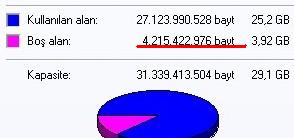
- Free disk space reported by "Disk Properties"
- ByDiskProperties.jpg (9.19 KiB) Viewed 5497 times

- Free disk space acquired via DOS (dir) command
- ViaDOSComand.jpg (4.34 KiB) Viewed 5497 times
Regards
--
Esgici
Re: hb_DiskSpace() Shows Incorrect Value
Posted: Thu Aug 05, 2010 5:26 pm
by Rathinagiri
There are two sizes for each file.
The actual file size and the size on disk. Whether that might be the cause of this problem?
Just my two cents...
Re: hb_DiskSpace() Shows Incorrect Value
Posted: Thu Aug 05, 2010 6:05 pm
by melliott42
Thanks for pointing this out guys.
Re: hb_DiskSpace() Shows Incorrect Value
Posted: Fri Aug 06, 2010 4:30 am
by swapan
Really interesting observation!
Re: hb_DiskSpace() Shows Incorrect Value
Posted: Fri Aug 06, 2010 12:32 pm
by esgici
rathinagiri wrote:
There are two sizes for each file.
The actual file size and the size on disk.
swapan wrote:Really interesting observation!
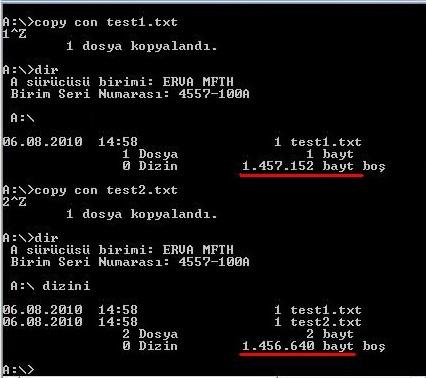
- FSizeTest.jpg (28.94 KiB) Viewed 5430 times
If you have a diskette drive on your PC, you can do this test:
Code: Select all
copy con test1.txt   // I'll write someting on console, save it to a file name is : test1.txt
1^Z                  // write only one character ("1") and than press ^Z (EOF) (or press F6)
                     // this terminate writing and save the file
dir                  // show me list of files on this folder ( A:\ )

...                  // some info about disk
...

06.08.2010    14:58       1 test1.txt
                 1 file            1 byte
                 0 folder  1.457.152 bytes free
And than repete :
Code: Select all
copy con test2.txt
1^Z

dir

...                  // some info about disk
...

06.08.2010    14:58       1 test1.txt
06.08.2010    14:58       1 test2.txt
                 2 file            2 byte
                 0 folder  1.456.640 bytes free
File size values ( 1 byte for each ) is actual file sizes.
1.457.152 - 1.456.640 =
512 is space occupied on disk by each 1 byte file.
This is because OS allocates disk space to file as 512 byte unites per request. FE if file size is 513 byte, allocated space will be 1024 bytes.
This is for FAT16 file system and for relatively small media (diskette in our example). While media grown, this allocation unit size too will be greater.
In NTFS, file allocation system is totally different and more complicated.
Regards
--
Esgici
PS: This little information dedicated to who search always a "tool" for every need.

Re: hb_DiskSpace() Shows Incorrect Value
Posted: Fri Aug 06, 2010 12:59 pm
by Rathinagiri
This is called the cluster size.

Thanks Esgici for the efforts.
Re: hb_DiskSpace() Shows Incorrect Value
Posted: Fri Aug 06, 2010 1:03 pm
by esgici
rathinagiri wrote:This is called the cluster size.
Yes, "allocation unit" is called sometime "cluster";
thanks Rathi
Regards
--
Esgici
Re: hb_DiskSpace() Shows Incorrect Value
Posted: Fri Aug 06, 2010 2:47 pm
by esgici
BUT !
"Cluster" concept doesn't reason of difference between DOS command result and "Disk Properties" report of Windows.
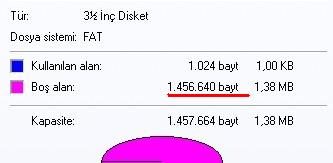
- DisketteProperties.jpg (10.09 KiB) Viewed 5420 times
Sadly, I don't know this reason

Does anyone know ?
Regards
--
Esgici
Re: hb_DiskSpace() Shows Incorrect Value
Posted: Fri Aug 06, 2010 3:06 pm
by sudip
Hello,
IMHO, dir command calculates SIZE OF THE FILE and Disk property calculates SIZE OF THE FILE
ON THE DISK (ie., amount of disk space being occupied).
So, what's the difference?
Size is the actual size of the file in bytes.
Size on disk is the actual amount of space being take up on the disk.
The disk is broken down into tracks and sectors.
So, if your sector size is 512 bytes and your file is actually 513 bytes, the size on disk will be 1024bytes because it is occupying two sectors.
(taken from
http://answers.yahoo.com/question/index ... 416AAzMmNu)