Browse Value doesn't change when pressing first letter

General Help regarding HMG, Compilation, Linking, Samples

Moderator: Rathinagiri

Post Reply
User avatar
sudip
Posts: 1456
Joined: Sat Mar 07, 2009 11:52 am
Location: Kolkata, WB, India

Browse Value doesn't change when pressing first letter

Post by sudip »

Hello All,

I found that value of browse control doesn't change when I am pressing first letter of the first column. The cell pointer moves but value doesn't change. It changes if I use arrow key or select using mouse.

Please check the sample:
BrowseTest.zip
(1.82 KiB) Downloaded 202 times
Is there any solution or there is a bug in my code?

Thanks in advance :)
With best regards,
Sudip
User avatar
esgici
Posts: 4543
Joined: Wed Jul 30, 2008 9:17 pm
DBs Used: DBF
Location: iskenderun / Turkiye
Contact:

Re: Browse Value doesn't change when pressing first letter

Post by esgici »

Hi Sudip

Checked, work fine; when pressed a letter key (upper or lower case) if found a column value match, row of browse changed; forward or backward.

(XP SP2)

Note : I learned just now this feature of browse, thanks :)

Regards

--

Esgici
Viva INTERNATIONAL HMG :D
User avatar
sudip
Posts: 1456
Joined: Sat Mar 07, 2009 11:52 am
Location: Kolkata, WB, India

Re: Browse Value doesn't change when pressing first letter

Post by sudip »

Hello Esgici,

Thanks a lot for checking. I tried it on my XP desktop and Win 7 laptop. Same problem.

I tested as follows:
1. I run the app.
2. Press "C" several times. Now cell pointer (or record pointer) goes to "CD" and "Computer" alternatively.
3. But the title doesn't change (on change event doesn't trigger).
4. It triggers only using arrow keys or using mouse.

If this problem is solved, browse can be a good choice for incremental search :o :)

Most of my apps are using Grid as incremental search control when CellNavigation is .f. :)
But when Grid is used with table, CellNavigation becomes .t. and this feature is off. And I am using DBFCDX in my current project ...

A few months ago, I requested Roberto to give option to set CellNavigation to .f. in case of Table Grid also for that reason ... :)


After some time:
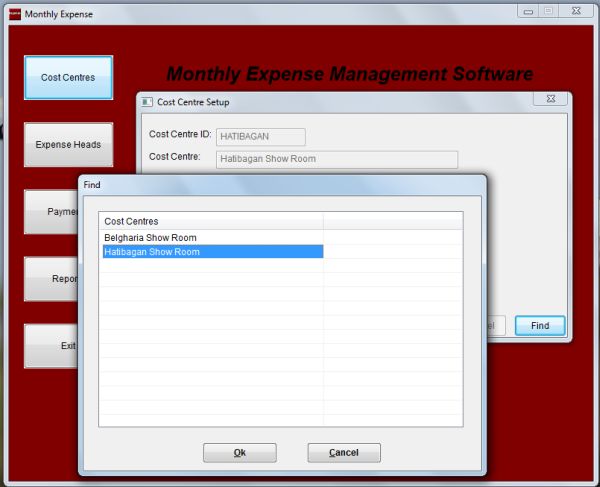
At last I can manage to do it with a normal grid (array). I tried my best to make it generic :) But, it may become slow for large dbf tables ;)
FindForm.jpg
FindForm.jpg (33.43 KiB) Viewed 1448 times
With best regards,
Sudip
Post Reply