Page 2 of 3
Re: "read" QR Code
Posted: Thu Apr 02, 2026 3:15 pm
by tonton2
AUGE_OHR wrote: ↑Thu Apr 02, 2026 3:02 pm
hi,
tonton2 wrote: ↑Wed Apr 01, 2026 9:30 pm
! Note : Read qrcode using Zbar utility
https://zbar.sourceforge.net/
after install Zbar you need to COPY
c:\Program Files\ZBar\bin\zbarimg.exe
and all *.DLL into your App Folder
Good evening, could you please show me all the installation steps? Thank you very much
sorry, i never have made a Installation, just READ about it
Merci
Re: "read" QR Code
Posted: Thu Apr 02, 2026 3:18 pm
by tonton2
serge_girard wrote: ↑Thu Apr 02, 2026 2:48 pm
Youcef, non je regrette mais DaNiElMaXiMiLiAnO s'en occupe. Il faut 'lire' le QRcode avec portable au tablet avec application APK et rendre le code/text du QR-code....
Aucun idee comment faire.
Serge
merci mon ami
Re: "read" QR Code
Posted: Thu Apr 02, 2026 3:19 pm
by AUGE_OHR
hi, i use this QR-Code READER.
the File is 60 MB, and i got a Error Message : "File too large: QRCODE_READER.ZIP" !!! (max 25 MB )
so i strip out these Files
i don´t know if "JSignPdf_setup_1.6.5_wjre.exe" also is need, it was i the ZIP File ( < 52 MB)
Re: "read" QR Code
Posted: Thu Apr 02, 2026 3:28 pm
by danielmaximiliano
Hola : despues de luchar y aprender sobre QR llegue a la meta

sin depender de algun ejectuble externo ya tenemos libreria propia

[/quote]
Re: "read" QR Code
Posted: Thu Apr 02, 2026 7:12 pm
by danielmaximiliano
Hola a todos :
Hice unas mejoras esteticas , espero les guste
Re: "read" QR Code
Posted: Thu Apr 02, 2026 8:15 pm
by tonton2
Je vous remercie beaucoup de votre aide
Thank you very much for your help.
Re: "read" QR Code
Posted: Thu Apr 02, 2026 8:51 pm
by AUGE_OHR
hi @danielmaximiliano ,
how to use your File "BarcodeQR.rar" ?
i try to use it with IDE, while DBLCLICK on Zbar.hbp , but than i got a lot Error
than i try it using "build.bat Zbar.hbp" but still get Error :
"Wrapper.Prg:9:23: fatal error: stb_image.h: No such file or directory"
What i´m doing wrong ?
Re: "read" QR Code
Posted: Thu Apr 02, 2026 9:26 pm
by danielmaximiliano
AUGE_OHR wrote: ↑Thu Apr 02, 2026 8:51 pm
What i´m doing wrong ?
Hola Jimmy : no puedo reproducir su error en mi PC, pero hice una prueba de copiar el contenido de la carpeta a otro lugar "c:\Temp\zbar" y desde el IDE de hmg.3.6 abrirlo y compilar en 64bits con el resultado de compilacion exitosa

dejo captura
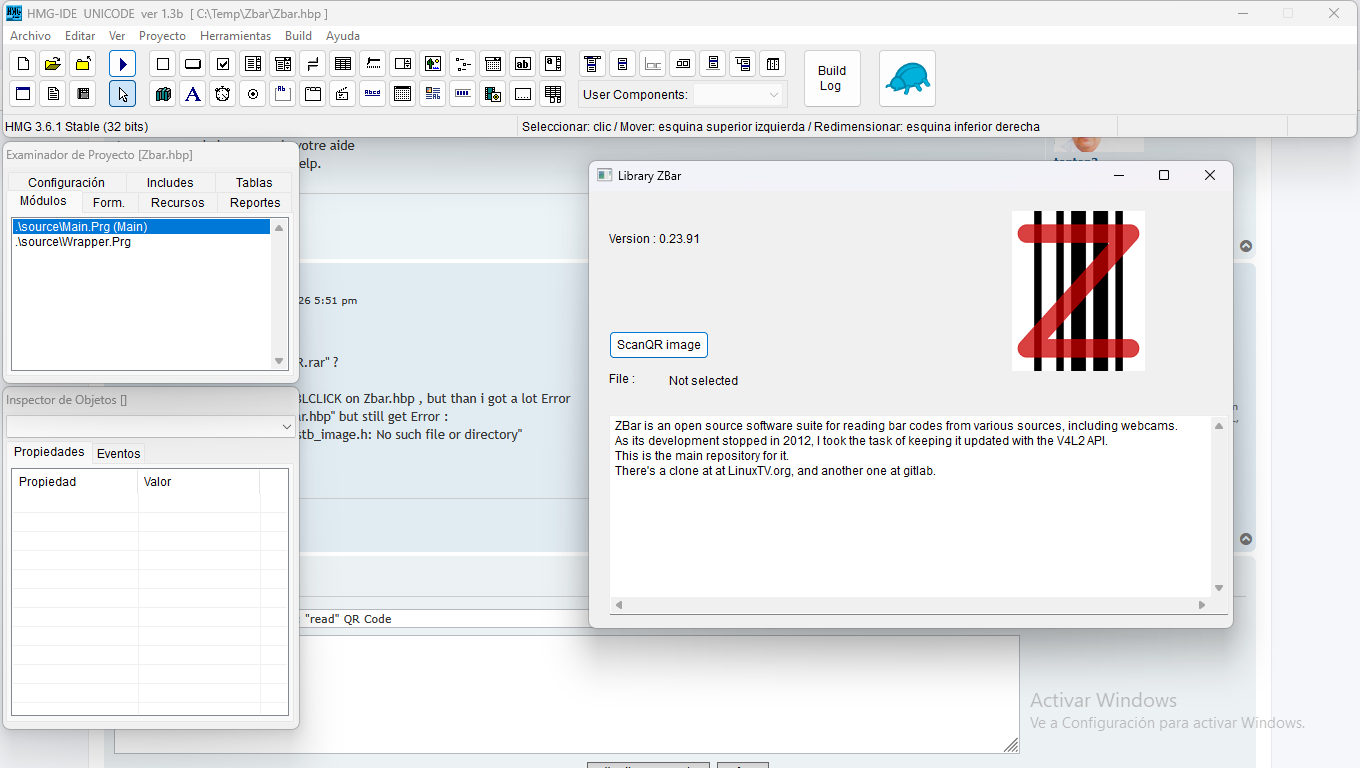
- Captura de pantalla 2026-04-02 182046.png (113.01 KiB) Viewed 568 times
puede ud. subir el contenido de error.log ?
"C:\Temp\Zbar\include\stb_image.h" <--- Header
Re: "read" QR Code
Posted: Fri Apr 03, 2026 10:19 am
by AUGE_OHR
hi,
Thx for Answer.
perhaps it is a Problem using v3.5 ?
i still get these Error Message
c:/hmg.3.5/mingw/bin/../lib/gcc/i686-w64-mingw32/9.3.0/../../../../i686-w64-mingw32/bin/ld.exe: .hbmk/win/mingw/Wrapper.o:Wrapper.c:(.text+0x18090): undefined reference to `zbar_version'
c:/hmg.3.5/mingw/bin/../lib/gcc/i686-w64-mingw32/9.3.0/../../../../i686-w64-mingw32/bin/ld.exe: .hbmk/win/mingw/Wrapper.o:Wrapper.c:(.text+0x180d4): undefined reference to `zbar_image_scanner_create'
c:/hmg.3.5/mingw/bin/../lib/gcc/i686-w64-mingw32/9.3.0/../../../../i686-w64-mingw32/bin/ld.exe: .hbmk/win/mingw/Wrapper.o:Wrapper.c:(.text+0x180e0): undefined reference to `zbar_image_scanner_destroy'
c:/hmg.3.5/mingw/bin/../lib/gcc/i686-w64-mingw32/9.3.0/../../../../i686-w64-mingw32/bin/ld.exe: .hbmk/win/mingw/Wrapper.o:Wrapper.c:(.text+0x1823e): undefined reference to `zbar_image_scanner_create'
c:/hmg.3.5/mingw/bin/../lib/gcc/i686-w64-mingw32/9.3.0/../../../../i686-w64-mingw32/bin/ld.exe: .hbmk/win/mingw/Wrapper.o:Wrapper.c:(.text+0x1825b): undefined reference to `zbar_image_scanner_set_config'
c:/hmg.3.5/mingw/bin/../lib/gcc/i686-w64-mingw32/9.3.0/../../../../i686-w64-mingw32/bin/ld.exe: .hbmk/win/mingw/Wrapper.o:Wrapper.c:(.text+0x18260): undefined reference to `zbar_image_create'
c:/hmg.3.5/mingw/bin/../lib/gcc/i686-w64-mingw32/9.3.0/../../../../i686-w64-mingw32/bin/ld.exe: .hbmk/win/mingw/Wrapper.o:Wrapper.c:(.text+0x18273): undefined reference to `zbar_image_set_format'
c:/hmg.3.5/mingw/bin/../lib/gcc/i686-w64-mingw32/9.3.0/../../../../i686-w64-mingw32/bin/ld.exe: .hbmk/win/mingw/Wrapper.o:Wrapper.c:(.text+0x1828b): undefined reference to `zbar_image_set_size'
c:/hmg.3.5/mingw/bin/../lib/gcc/i686-w64-mingw32/9.3.0/../../../../i686-w64-mingw32/bin/ld.exe: .hbmk/win/mingw/Wrapper.o:Wrapper.c:(.text+0x182ac): undefined reference to `zbar_image_set_data'
c:/hmg.3.5/mingw/bin/../lib/gcc/i686-w64-mingw32/9.3.0/../../../../i686-w64-mingw32/bin/ld.exe: .hbmk/win/mingw/Wrapper.o:Wrapper.c:(.text+0x182b8): undefined reference to `zbar_scan_image'
c:/hmg.3.5/mingw/bin/../lib/gcc/i686-w64-mingw32/9.3.0/../../../../i686-w64-mingw32/bin/ld.exe: .hbmk/win/mingw/Wrapper.o:Wrapper.c:(.text+0x182c0): undefined reference to `zbar_image_first_symbol'
c:/hmg.3.5/mingw/bin/../lib/gcc/i686-w64-mingw32/9.3.0/../../../../i686-w64-mingw32/bin/ld.exe: .hbmk/win/mingw/Wrapper.o:Wrapper.c:(.text+0x182cc): undefined reference to `zbar_symbol_get_data'
c:/hmg.3.5/mingw/bin/../lib/gcc/i686-w64-mingw32/9.3.0/../../../../i686-w64-mingw32/bin/ld.exe: .hbmk/win/mingw/Wrapper.o:Wrapper.c:(.text+0x182dc): undefined reference to `zbar_image_destroy'
c:/hmg.3.5/mingw/bin/../lib/gcc/i686-w64-mingw32/9.3.0/../../../../i686-w64-mingw32/bin/ld.exe: .hbmk/win/mingw/Wrapper.o:Wrapper.c:(.text+0x182e4): undefined reference to `zbar_image_scanner_destroy'
do i need to copy Directory QR_READER\include\ and QR_READER\Lib\ to Main \LIB and \INCLUDE ?
Re: "read" QR Code
Posted: Fri Apr 03, 2026 1:27 pm
by danielmaximiliano
AUGE_OHR wrote: ↑Fri Apr 03, 2026 10:19 am
hi,
Thx for Answer.
perhaps it is a Problem using v3.5 ?
i still get these Error Message
do i need to copy Directory QR_READER\include\ and QR_READER\Lib\ to Main \LIB and \INCLUDE ?
Hi Jimmy: I've never quite understood Harbour's strictness. I've always worked in other languages without problems, using IDEs like VFP and Lazarus, where you have a folder structure and place the essential files there. In this case, \Include and \Lib, and within the HMG IDE, add the compilation directives in the project browser, under the "Settings" tab, as follows:
Code: Select all
libpaths=.\Lib
incpaths=.\Include
libs=zbar
libs=iconv
Libpaths: I specify where the third-party libraries are located.
Incpaths: I specify where the third-party header files are located.
In the command line, they can be added as if they were necessary files for all projects; simply copy them to the \inc and \lib folders of hmg or harbour. Years ago, I had this same problem compiling hbtip or hbcurl.
An .hbp file can also contain this
Code: Select all
# --- Nombre del ejecutable final ---
-oZbarScan.exe

# --- Carpetas de inclusión (Archivos .ch o .h) ---
-i=.\include
-i=C:\ZBar\include

# --- Carpetas de librerías (.lib) ---
-L=C:\ZBar\lib

# --- Librerías específicas a enlazar ---
-lzbar
-lhbct

# --- Archivos fuentes del proyecto ---
source\Principal.prg
source\Wrapper.prg