Page 2 of 2

Re: Windows 11

Posted: Mon Oct 25, 2021 6:41 am
by gfilatov
mol wrote: Mon Oct 25, 2021 5:22 am Did you install w 11 over w 10 or new installation on clean drive?
Hi Marek,

The Win 11 was installed over Win 10 with restore all programs and documents. 8-)

Re: Windows 11

Posted: Mon Oct 25, 2021 7:04 am
by edk
gfilatov wrote: Sun Oct 24, 2021 1:08 pm (...) and I had a positive impression from Win 11 look and feel. 8-)
Hi Grigory.
Does your Windows 11 task manager also "eat up" CPU resources at idle? :roll:
In the first release of Windows 11 used over 50% of CPU, after the last update it uses around 10%, but still much more than in Windows 10. :shock:
Win11 (22000.282).png
Win11 (22000.282).png (370.86 KiB) Viewed 2728 times

Re: Windows 11

Posted: Mon Oct 25, 2021 6:18 pm
by gfilatov
edk wrote: Mon Oct 25, 2021 7:04 am
gfilatov wrote: Sun Oct 24, 2021 1:08 pm (...) and I had a positive impression from Win 11 look and feel. 8-)
Hi Grigory.
Does your Windows 11 task manager also "eat up" CPU resources at idle? :roll:
In the first release of Windows 11 used over 50% of CPU, after the last update it uses around 10%, but still much more than in Windows 10. :shock:
Win11 (22000.282).png
Hi Edward,

You are correct.

Tasm Manager in Windows 10 allocates 10 MB memory but in Win 11 (22000.282) as below: :o
Task manager in Win 11
capture.jpg (66.1 KiB) Viewed 2707 times

Re: Windows 11

Posted: Tue Oct 26, 2021 10:17 am
by edk
gfilatov wrote: Mon Oct 25, 2021 6:18 pm Tasm Manager in Windows 10 allocates 10 MB memory but in Win 11 (22000.282) as below: :o
capture.jpg
I can see that your Gen.5 CPU i7-5500U, although not officially supported by Windows 11, is doing much better (0,7% CPU Task Manager) than my also not officially supported Gen. 7 (10% CPU Task Manager) ;)
CPU Info.png
CPU Info.png (95.56 KiB) Viewed 2674 times

Re: Windows 11

Posted: Tue Oct 26, 2021 6:44 pm
by mol
I'm wonder how it will work on my core i5-2520M 2.50GHz with 10GB RAM.
I'm planning clone my disk first and after that install win11 to have possibility to return to win10

Re: Windows 11

Posted: Tue Oct 26, 2021 7:30 pm
by andyglezl
gfilatov wrote: ↑Mon Oct 25, 2021 11:18 am
Tasm Manager in Windows 10 allocates 10 MB memory
??? Task Manager in Windows 10
imagen_2021-10-26_142141.png
imagen_2021-10-26_142141.png (301.12 KiB) Viewed 2631 times

Re: Windows 11

Posted: Tue Oct 26, 2021 8:16 pm
by Claudio Ricardo
Hi... Telemetry waste alot of resources... in w10 we can disabled... in w11 i don't know ?

Re: Windows 11

Posted: Wed Oct 27, 2021 7:07 am
by AUGE_OHR
hi,

while my Windows 10 32 Bit Insider Version 10.0.21390.2025 have a "Time Bomb" at End of Month i have installed Windows 11 instead.

i use a "special" ISO which "skip" test of TPM, Secure Boot or GPT which i do not have in that Mini-PC.
my 1st try fail ... while i was connect to Internet and "Setup" was load from Internet ... :roll:

---

2 Ways : "clean" Install or "Inplace"

when call Setuo from "running" Windows than you do a "Inplace" where you can "hold" all Programm Setting
while i want to "destroy" old Insider Version i do boot from USB-Stick

you can get ISO from here (English Version)

Windows 11 22000

Win11-English-x64-GDR-ZERO-LIMIT.ISO (22000.194)
https://t1p.de/b6jt

22000.258.MVS-CONSUMER-OCTOBER-ZERO-LIMIT.ISO
https://t1p.de/4rg6

22000.282.Cobalt-X64-EN-US-XXXL-ZERO-LIMIT-V6.ISO
https://t1p.de/qctt

Windows 11 Dev-Kanal

22483.1000.Nickel-X64-EN-US--XXXL-ZERO-LIMIT-DEV.V8.ISO
https://t1p.de/3hml

! Note : ISO include "all" Version so you must use Version match to your Key (is in UEFI)
! Note : WIM File is > 4 GB so USB-Stick need NTFS ( not FAT32 )

after Install, without any Problem, i called Windows Update for "latest" Version.
i got it and installed also without Problem

but not all Hardware was recognize so i need to install them manual ( from Driver-Backup )***
*** run CMD as Administrator and type

Code: Select all

DISM /online /export-driver /destination:C:\DRIVER_BACKUP
where "C:\DRIVER_BACKUP" is Target place

i have look at "License" and it was "digital sign" and activate

so i got 3 x OS on PC : Windows 10 32/64 Bit and Windows 11 64 Bit :D


---

"general" Win32 Apps work under Windows 11 like in Windows 10 ...

but again M$ have "clean up old Stuff" so WIMdiag.EXE is missing.
next Version also do not have WMIC.EXE so you have to re-write Script for PowerShell or ActiveX

my Xbase++ and HMG Apps do run ... and also new HBFM MiniGUI Version (still under Construction )
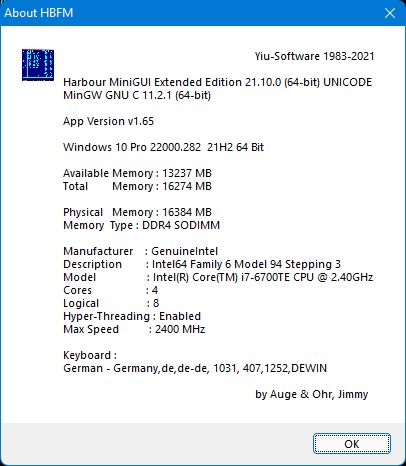
HBFM_MiniGUI_W11.jpg
HBFM_MiniGUI_W11.jpg (33.51 KiB) Viewed 2608 times