
Hi!
I'm using modela forms, called one from another.
Sometimes last called form is hidden under previous.
Is it the way to bring last to be topmost?
Bring modal form to the top
Moderator: Rathinagiri
-
serge_girard

- Posts: 3420
- Joined: Sun Nov 25, 2012 2:44 pm
- DBs Used: 1 MySQL - MariaDB
2 DBF - Location: Belgium
- Contact:
Re: Bring modal form to the top
I have had the same problems and therefore I don't use modal anymore...
Perhaps there is some bug in it?
Or some tricky coding behind it to get it well...? Claudio?
Serge
Perhaps there is some bug in it?
Or some tricky coding behind it to get it well...? Claudio?
Serge
There's nothing you can do that can't be done...
-
AUGE_OHR

- Posts: 2117
- Joined: Sun Aug 25, 2019 3:12 pm
- DBs Used: DBF, PostgreSQL, MySQL, SQLite
- Location: Hamburg, Germany
Re: Bring modal form to the top
hi,
i have never used a Modal Window but you can try "FindWindowA" an bring it ToFront
i have never used a Modal Window but you can try "FindWindowA" an bring it ToFront
Code: Select all
Function toFront()
LOCAL cTitle  := "my Window Title"
LOCAL hWndDlg := DllCall( "User32.dll", DLL_STDCALL, "FindWindowA", 0, cTitle )
   IF !( hWndDlg == 0 )
      DllCall( "User32.dll", DLL_STDCALL, "SetForegroundWindow", hWndDlg )
      DllCall( "User32.dll", DLL_STDCALL, "BringWindowToTop", hWndDlg )
      DllCall( "User32.dll", DLL_STDCALL, "ShowWindow", hWndDlg, 1 )
      DllCall( "User32.dll", DLL_STDCALL, "UpdateWindow", hWndDlg )
   ENDIF
RETURN
have fun
Jimmy
Jimmy
Re: Bring modal form to the top
Thank you!
Why not modal? I think it's better than child or standard
PS.
I found another solution... but it sauses some problems while switching to another apps:
Why not modal? I think it's better than child or standard
PS.
I found another solution... but it sauses some problems while switching to another apps:
Code: Select all
SetWindowPos( MyForm.HANDLE, -1 , 0, 0, 0, 0, hb_bitOR( SWP_NOMOVE, SWP_NOSIZE ) )
Re: Bring modal form to the top
I use modal. I like it because it makes users in a network environment to finish what they doing before going somewhere else.
In my programs I make my starting program windows larger then any functions happening from these windows. This way a person can
see that there is a window before the window they are working in and can move the window see a window under it.
I would be nice at times like when in an invoice for a customer and wanting to know what what I sold an item to him before.
When in this situation I can start a new main program and go look then exit and come back to first program. I try to educate my users
to finish what they are doing before leaving the computer with locked files so nobody else can use them.
In my programs I make my starting program windows larger then any functions happening from these windows. This way a person can
see that there is a window before the window they are working in and can move the window see a window under it.
I would be nice at times like when in an invoice for a customer and wanting to know what what I sold an item to him before.
When in this situation I can start a new main program and go look then exit and come back to first program. I try to educate my users
to finish what they are doing before leaving the computer with locked files so nobody else can use them.
All The Best,
Franco
Canada
Franco
Canada
Re: Bring modal form to the top
Manipulating forms causes some problems in my app.
When I bring my form to the top, after switching to another application, my form is not covered by it. It's stressful when I center my app window, and try to print something from another - printing window is undelayed and unusable...
When I bring my form to the top, after switching to another application, my form is not covered by it. It's stressful when I center my app window, and try to print something from another - printing window is undelayed and unusable...
Re: Bring modal form to the top
I have another question
Did someone find a way to calorize TAB control? I'm using tab control, but I have an idea to use different back color for different pages..
Is it possible?
Did someone find a way to calorize TAB control? I'm using tab control, but I have an idea to use different back color for different pages..
Is it possible?
-
AUGE_OHR
- Posts: 2117
- Joined: Sun Aug 25, 2019 3:12 pm
- DBs Used: DBF, PostgreSQL, MySQL, SQLite
- Location: Hamburg, Germany
Re: Bring modal form to the top
hi,
i made in XBase++ and Fivewin for "Dark Mode"
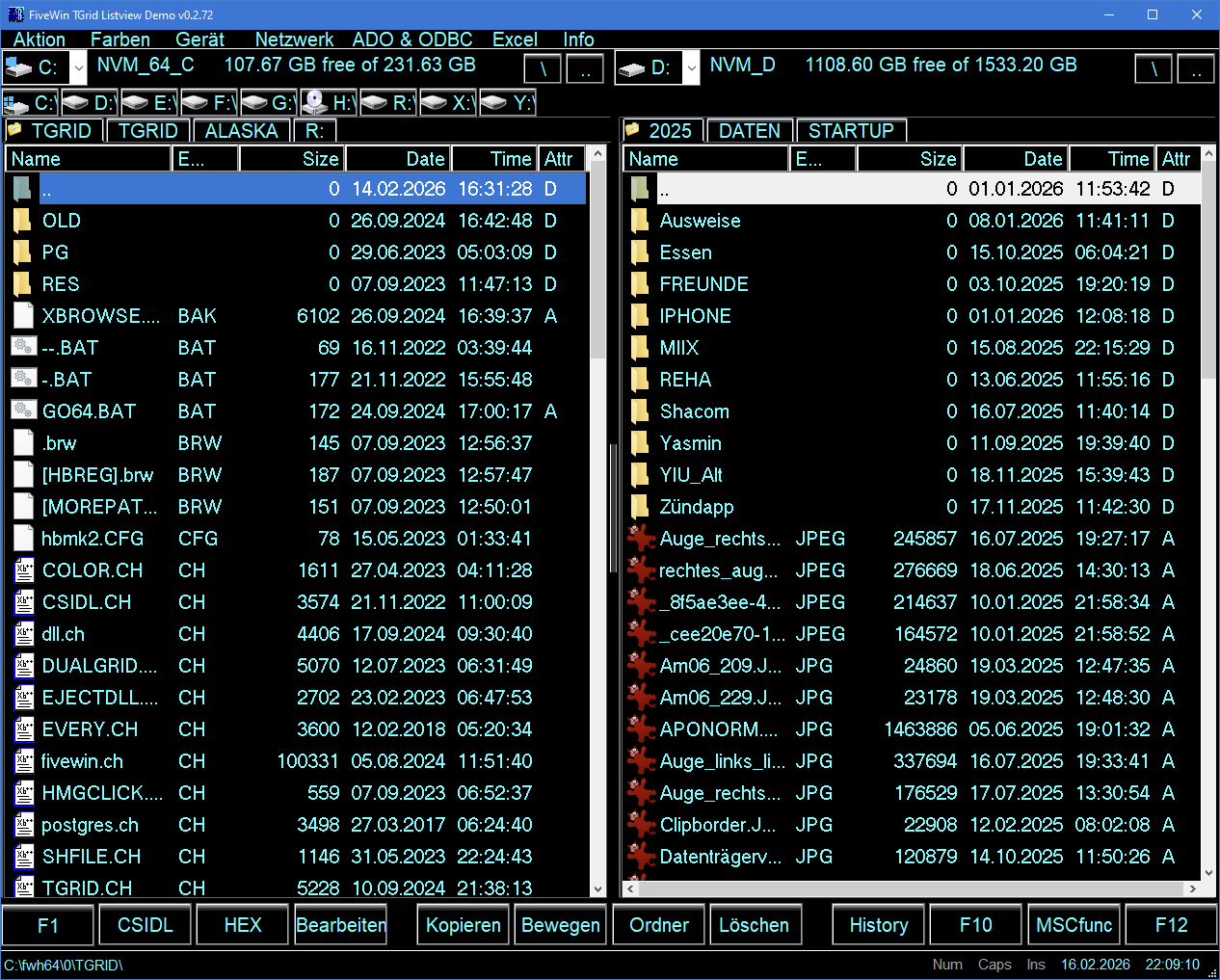
and use Icon for "active" TAB (which can also done under HMG )
here CODE, to change "active" TAB Icon, for HMG
p.s. as i remember right there is a Class to Ownerdraw Button under HMG.
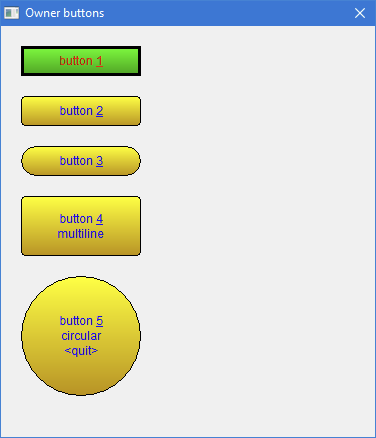
YES, you need Ownerdraw (not sure how to do it in HMG) !
i made in XBase++ and Fivewin for "Dark Mode"
and use Icon for "active" TAB (which can also done under HMG )
here CODE, to change "active" TAB Icon, for HMG
Code: Select all
PROCEDURE Tab_Change_Icon( cParentForm, cControlName, nNo )
LOCAL nControlHandle
LOCAL xTab, nTab, Images, i, NoTrans := .F.
LOCAL aImages        := {}

   xTab := GetProperty( cParentForm, cControlName, "Value" )
   IF VALTYPE( xTab ) = "A"
      nTab := xTab[ 1 ]
   ELSE
      nTab := xTab
   ENDIF

   IF nNo = 2 // right side
      nDimRight := LEN( Stack_Right )
      FOR i := 1 TO nDimRight
         IF i = nTab
            AADD( aImages, "GRUENPUNKT" )
         ELSE
            AADD( aImages, "MYFIXDRIVE16" )
         ENDIF
      NEXT
   ELSE
      nDimLeft := LEN( Stack_Left )
      FOR i := 1 TO nDimLeft
         IF i = nTab
            AADD( aImages, "GRUENPUNKT" )
         ELSE
            AADD( aImages, "MYFIXDRIVE16" )
         ENDIF
      NEXT
   ENDIF

   nControlHandle := GetControlHandle( cControlName, cParentForm )
   // not sure need to Destroy "old" Imagelist before
   IMAGELIST_DESTROY( nControlHandle )
   // will create own Imagelist and set TCM_SETIMAGELIST
   ADDTABBITMAP( nControlHandle, aImages, NoTrans ) // found in \SOURCE\h_tab.prg

RETURN
have fun
Jimmy
Jimmy
Re: Bring modal form to the top
I can open 1,2,or3 of the same exe. I have the program on the start menu at bottom of screen. When I point on the program on the start
menu all programs show up. I just pick the started program I want to use. One program may be in customer file, one in inventory,
one in invoicing. Maybe this does not work for you. As I stated before I do not recommend this in a network because you could be locking
someone out of a file you have just sitting there.
menu all programs show up. I just pick the started program I want to use. One program may be in customer file, one in inventory,
one in invoicing. Maybe this does not work for you. As I stated before I do not recommend this in a network because you could be locking
someone out of a file you have just sitting there.
All The Best,
Franco
Canada
Franco
Canada