How to change row backcolor in grid

General Help regarding HMG, Compilation, Linking, Samples

Moderator: Rathinagiri

Post Reply
User avatar
mol
Posts: 3825
Joined: Thu Sep 11, 2008 5:31 am
Location: Myszków, Poland
Contact:

How to change row backcolor in grid

Post by mol »

Hi!
I want to change defauld grey color of grid row when grid is out of focus.
We have function:

Code: Select all

CellNavigationColor ( _SELECTEDROW_BACKCOLOR, {0,196,255} )
But it changes colors only when grid is Cell Navigated
User avatar
AUGE_OHR
Posts: 2117
Joined: Sun Aug 25, 2019 3:12 pm
DBs Used: DBF, PostgreSQL, MySQL, SQLite
Location: Hamburg, Germany

Re: How to change row backcolor in grid

Post by AUGE_OHR »

hi,

as i can say Color of "Cursor" in GRID come from OS Theme
it is the same Color like Titlebar active/inactive

so you need OwnerDraw/CustomDraw to "paint" Color you want
Color_Panel.JPG
Color_Panel.JPG (281.84 KiB) Viewed 1560 times
have fun
Jimmy
gisjr134
Posts: 47
Joined: Tue Dec 08, 2020 11:37 am
DBs Used: DBF,MySQL,PostgreSQL
Location: Brasil
Contact:

Re: How to change row backcolor in grid

Post by gisjr134 »

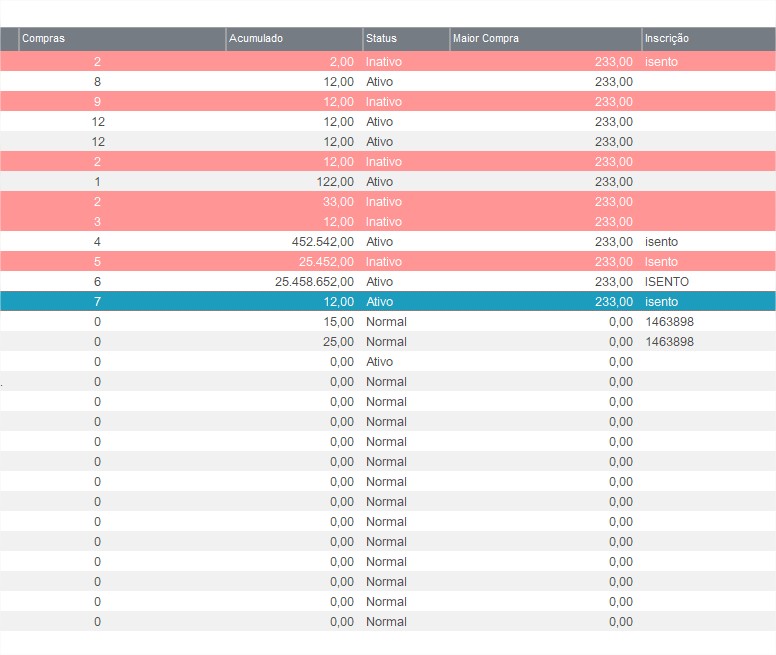
[image][/image]
cGHYY1.jpg
cGHYY1.jpg (77.66 KiB) Viewed 1507 times

Greeting to All ,

I Tried to Do it in Grid Component , Something similar to ownerDraw , But it is not 100% , Because it's still flickering sometime . It´s like the windows receveing a message and paint its Background with Default Color.
nIndexEve1 := EventCreate( { || LabelEventH4() } , ListView_GetHeader(GetControlHandle( 'br_grid', cActiveJan )) )

Function xDrawHead()

//Local nHWnd := ListView_GetHeader(GetControlHandle( 'br_grid', cFormPrin ))
Local aMtrHeader := xGetHeader()
Local nHWnd := ListView_GetHeader(GetControlHandle( 'br_grid', cActiveJan ))
Local aM1 := {}
Local aTams1 := xGetInfoHead('TAM')
Local n1

For n1 := 1 To Len(aMtrHeader)
//Aadd(aM1 , hb_OemToAnsi(aMtrHeader[n1]) )

Aadd(aM1 , hb_Utf8ToStr(aMtrHeader[n1]) )
Aadd(aTams1 , aTams1[n1] )
Next


ControlBackX( nHWnd , {255,121,12} , aM1 , Len(aMtrHeader) , aTams1 , nColSel , nColOrder , 'img\setaa.bmp' , 'img\setab.bmp' , lAscendente )


Return

FUNCTION LabelEventH4(aLabel)

If (nMsg == WM_PAINT)
If !lInvalid
xDrawHead()
End If
End If

And whein i need to Repaint in the Correct Color(Header Backcolor of the Grid) , i do This.

If _isControlDefined( 'br_grid' , cactivejan )
BT_SCR_INVALIDATERECT( ListView_GetHeader(GetControlHandle( 'br_grid', cActivejan )) , Nil , .t. )
End If

To repeat the Process.

c1.jpg
c1.jpg (47 KiB) Viewed 1507 times
c2.jpg
c2.jpg (55.72 KiB) Viewed 1507 times
Anyone Know how to Fix This problem?
User avatar
mol
Posts: 3825
Joined: Thu Sep 11, 2008 5:31 am
Location: Myszków, Poland
Contact:

Re: How to change row backcolor in grid

Post by mol »

AUGE_OHR wrote: Mon Oct 18, 2021 10:04 pm hi,

as i can say Color of "Cursor" in GRID come from OS Theme
it is the same Color like Titlebar active/inactive

so you need OwnerDraw/CustomDraw to "paint" Color you want
Color_Panel.JPG
How to realize it?
User avatar
AUGE_OHR
Posts: 2117
Joined: Sun Aug 25, 2019 3:12 pm
DBs Used: DBF, PostgreSQL, MySQL, SQLite
Location: Hamburg, Germany

Re: How to change row backcolor in grid

Post by AUGE_OHR »

hi Mol,
mol wrote: Tue Oct 19, 2021 8:34 pm How to realize it?
i´m afraid that OwnerDraw is not implement in HMG
as i can say Ownerdraw is only implement in GRID Header under HMG.

the Snapshot show my own native Control made for Xbase++
have fun
Jimmy
gisjr134
Posts: 47
Joined: Tue Dec 08, 2020 11:37 am
DBs Used: DBF,MySQL,PostgreSQL
Location: Brasil
Contact:

Re: How to change row backcolor in grid

Post by gisjr134 »

Hello To all ,

I Tried to use TsBrowse , a Version Adapted to Hmg wich has ownerDraw , but it didn´t work correctly.
Post Reply